
Appearance
防火墙
- 包 packet:数据传输过程,将数据拆分成若干包进行传输。
- 包过滤防火墙:根据定义规则过滤数据包
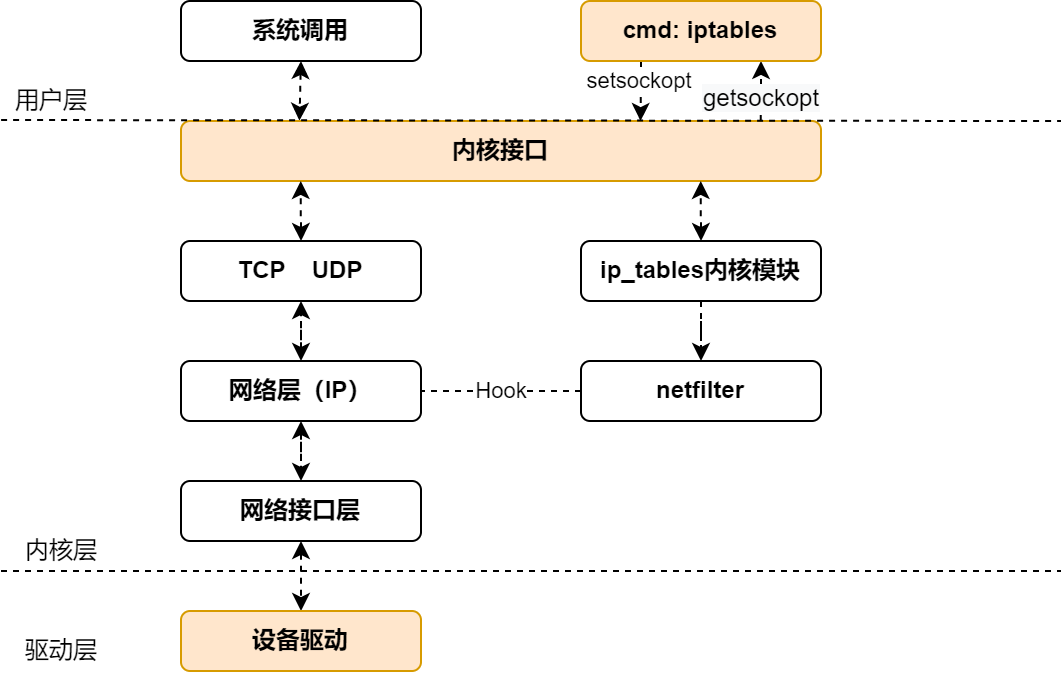
netfilter
防火墙框架(framework)位于内核空间,包过滤防火墙。具备包过滤、封包重定向、网络地址转换(NAT, Network Address Translate)等功能。 ls -l /usr/lib/modules/net/netfilter
netfilter/client
一系列的客端工具,底层由 netfilter 框架提供支持,各工具 API 和 lib 库不同。单一工具操作切忌交叉使用!
架构层次示例:
应用层工具 (用户空间)
    ↓
iptables/nftables API (libiptc/libnftnl)
    ↓
Netlink 接口 / procfs/sysfs
    ↓
Netfilter 框架 (内核空间) ⬅ 这是核心
    ↓
Linux 内核网络栈- iptables:传统工具
- nftables:新一代工具(替换 iptables)
- Firewalld:RHEL/CentOS/Fedora(有配套GUI工具)
- UFW (Uncomplicated FireWall):Ubuntu/Debian(有配套GUI工具)
链/表/规则
执行流程:
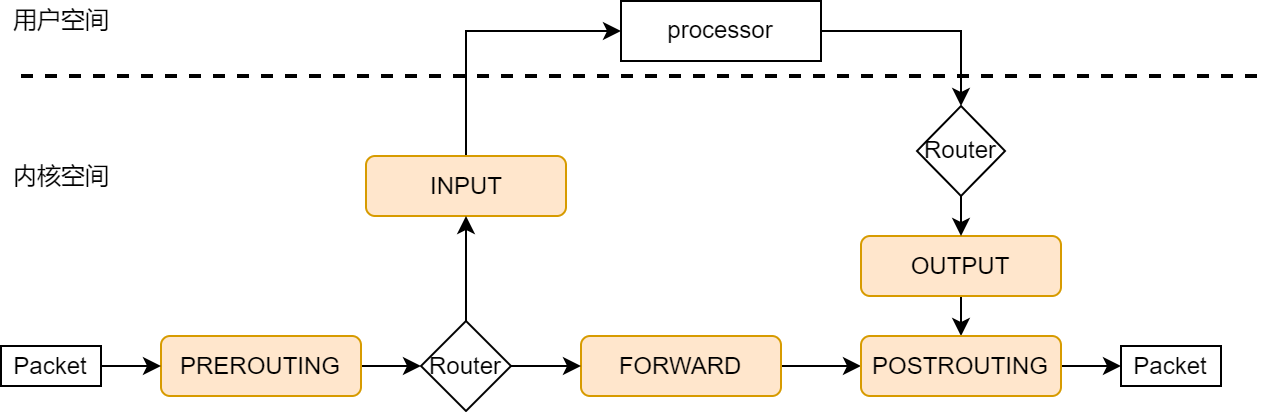 TCP/IP 协议栈内核的一部分,网络层中通过钩子函数(Hook)接入 netfilter 框架。包(packet)传输后经由各个规则链决策转发,或者用户空间处理产生新的包回应。
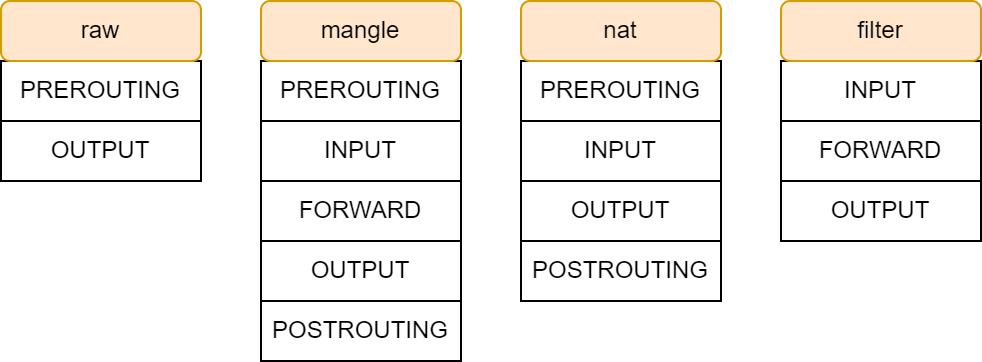
表:系列功能相似“规则”的集合
- raw:决定数据包是否被状态追踪机制处理。
- mangle:修改数据包服务类型、TTL、可以配置路由实现QoS。
- nat:用于网络地址转换。
- filter:过滤数据包。
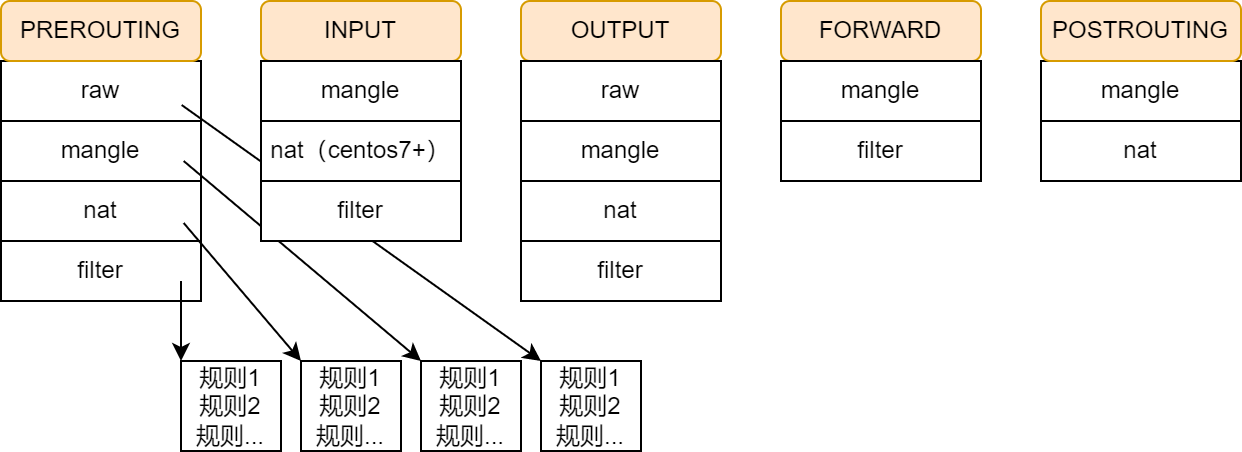
链:同一点上有序的“规则”的决策链
- PREROUTING:主机外报文进入位置,所有数据包先由该链处理。
- FORWARD:转发包时应用此规则链。
- INPUT:进入的数据包应用此规则链。
- OUTPUT:外出的数据包应用此规则链。
- POSTROUTING:报文经由被转发出去,所有的数据包出来的时候都先由这个链处理。
规则:一条规则包含匹配条件和处理动作
- 匹配条件:source IP、source Port、destination IP、distination Port
- 处理动作:TARGET 一词这里解释为处理动作容易理解
- ACCPET:允许数据包通过。
- DROP:丢弃数据包,并且不回应信息。
- REJECT:拒绝数据包通过,会回应一个响应信息。
- SNAT:源地址转换,解决内网用户同一个公网地址上网问题。
- MASQUERADE:一种 SNAT 的特殊形式,适用于 动态的、临时会变的 IP 上。
- DNAT:目标地址转换。
- REDIRECT:在本机做端口映射。
- LOG:在
/var/log/messages文件中记录日志信息,然后将数据包传递给下一条规则。 更多,man 8 iptables-extensions/TARGET EXTENSIONS
状态(State)
sh
# NEW: 新建连接的第一个数据包
# ESTABLISHED: 已建立的连接
# RELATED: 与已有连接相关的连接(如FTP、ICMP错误)
# INVALID: 无效的数据包
# UNTRACKED: 未跟踪的连接
iptables -A CHAIN -t TABLE -m state --state STATE[,STATE...] -j TARGET
netfilter/iptables
sh
#administration tool for IPv4/IPv6 packet filtering and NAT
$ iptables
# -t [table]:
# -A chain: append to chain
# -I chain [rulenum]: insert in chain as rulenum (default first)
# -D chain [rulenum]: delete matching rule from chain(defualt first)
# -L [chain [rulenum]]: list the rules in a chain or all chain
# -F [chain]: delete all rules in chain or all chain
# -P chain target:
# -N chain: create a new user-defined chain
# -X [chain]: delete a user-defined chain
# -s address[/mask][...]: source specification
# -d address[/mask][...]: destination specification
# -i name: input interface name
# -o name: output interface name
# --sport port: specification source port
# --dport port: specification destination port
# -p <tcp/udp/icmp>
# -j target:

$ iptables -nvL [chain] [-t table] --line-numbers
# 添加日志规则(临时调试)
# RHEL 日志位置 /var/log/messages
# Debian 日志位置 /var/log/kern.log
$ iptables -I INPUT 1 -m state --state NEW -j LOG --log-prefix "DEBUG-NEW: "
$ iptables -I INPUT 2 -m state --state ESTABLISHED -j LOG --log-prefix "DEBUG-EST: "
$ iptables -I INPUT 3 -m state --state RELATED -j LOG --log-prefix "DEBUG-REL: "
$ iptables -I INPUT 4 -m state --state INVALID -j LOG --log-prefix "DEBUG-INV: "
基础防火墙
sh
#!/bin/bash
# basic-stateful-firewall.sh

# 允许本地回环接口
iptables -A INPUT -i lo -j ACCEPT
iptables -A OUTPUT -o lo -j ACCEPT

# 允许已建立的和相关的连接
iptables -A INPUT -m state --state ESTABLISHED,RELATED -j ACCEPT

# 允许ping(ICMP)
iptables -A INPUT -p icmp --icmp-type 8 -m state --state NEW,ESTABLISHED -j ACCEPT

# 允许SSH(端口22)HTTP(80)和HTTPS(443)
iptables -A INPUT -p tcp --dport 22 -m state --state NEW -j ACCEPT
iptables -A INPUT -p tcp --dport 80 -m state --state NEW -j ACCEPT
iptables -A INPUT -p tcp --dport 443 -m state --state NEW -j ACCEPT
# 数据库(仅内网)
iptables -A INPUT -p tcp --dport 3306 -s 10.0.0.0/8 -m state --state NEW -j ACCEPT

# 允许DNS查询
iptables -A INPUT -p udp --dport 53 -j ACCEPT
iptables -A INPUT -p tcp --dport 53 -j ACCEPT

# 记录被拒绝的包(可选)
iptables -A INPUT -j LOG --log-prefix "IPTABLES-DROPPED: " --log-level 4
# 限制ICMP(防止Ping Flood)
iptables -A INPUT -p icmp --icmp-type echo-request -m limit --limit 1/s -j ACCEPT
# 防止 SYN flood
iptables -A INPUT -p tcp --syn -m limit --limit 1/s --limit-burst 3 -j ACCEPT
# 防止 UDP flood
iptables -A INPUT -p udp -m limit --limit 100/s --limit-burst 100 -j ACCEPT
端口转发
sh
# 将外部访问8080端口转发到内网192.168.1.100的80端口
iptables -t nat -A PREROUTING -p tcp --dport 8080 -j DNAT --to-destination 192.168.1.100:80
iptables -t nat -A POSTROUTING -p tcp -d 192.168.1.100 --dport 80 -j SNAT --to-source [网关IP]
杂项
sh
# 限制最大连接数
iptables -A INPUT -p tcp --dport 22 -m connlimit --connlimit-above 3 -j DROP

# 限制每IP每秒最多10个HTTP新连接
iptables -A INPUT -p tcp --dport 80 -m limit --limit 10/min --limit-burst 20 -j ACCEPT
Debian 增加防火墙
sh
#!/bin/sh
### BEGIN INIT INFO
# Provides:          myfirewall
# Required-Start:    $local_fs
# Required-Stop:     $local_fs
# Default-Start:     S
# Default-Stop:      0 6
# X-Start-Before:    $network
# X-Stop-After:      $network
# Short-Description: My custom firewall.
### END INIT INFO
#
# Simple example firewall configuration.
#
# Caveats:
# - This configuration applies to all network interfaces
#   if you want to restrict this to only a given interface use
#   '-i INTERFACE' in the iptables calls.
# - Remote access for TCP/UDP services is granted to any host,
#   you probably will want to restrict this using '--source'.
#
# chkconfig: 2345 9 91
# description: Activates/Deactivates the firewall at boot time
#
# You can test this script before applying with the following shell
# snippet, if you do not type anything in 10 seconds the firewall
# rules will be cleared.
#---------------------------------------------------------------
#  while true; do test=""; read  -t 20 -p "OK? " test ; \
#  [ -z "$test" ] && /etc/init.d/myfirewall clear ; done
#---------------------------------------------------------------

PATH=/bin:/sbin:/usr/bin:/usr/sbin

# Services that the system will offer to the network
TCP_SERVICES="22" # SSH only
UDP_SERVICES=""
# Services the system will use from the network
REMOTE_TCP_SERVICES="80" # web browsing
REMOTE_UDP_SERVICES="53" # DNS
# Network that will be used for remote mgmt
# (if undefined, no rules will be setup)
# NETWORK_MGMT=192.168.0.0/24
# If you want to setup a management network (i.e. you've uncommented
# the above line) you will need to define the SSH port as well (i.e.
# uncomment the below line.) Remember to remove the SSH port from the
# TCP_SERVICES string.
# SSH_PORT="22"

if ! [ -x /sbin/iptables ]; then
    exit 0
fi

fw_start () {

  # Input traffic:
  /sbin/iptables -A INPUT -m state --state ESTABLISHED,RELATED -j ACCEPT
  # Services
  if [ -n "$TCP_SERVICES" ] ; then
  for PORT in $TCP_SERVICES; do
    /sbin/iptables -A INPUT -p tcp --dport ${PORT} -j ACCEPT
  done
  fi
  if [ -n "$UDP_SERVICES" ] ; then
  for PORT in $UDP_SERVICES; do
    /sbin/iptables -A INPUT -p udp --dport ${PORT} -j ACCEPT
  done
  fi
  # Remote management
  if [ -n "$NETWORK_MGMT" ] ; then
    /sbin/iptables -A INPUT -p tcp --src ${NETWORK_MGMT} --dport ${SSH_PORT} -j ACCEPT
  fi
  # Remote testing
  /sbin/iptables -A INPUT -p icmp -j ACCEPT
  /sbin/iptables -A INPUT -i lo -j ACCEPT
  /sbin/iptables -P INPUT DROP
  /sbin/iptables -A INPUT -j LOG

  # Output:
  /sbin/iptables -A OUTPUT -j ACCEPT -o lo
  /sbin/iptables -A OUTPUT -m state --state ESTABLISHED,RELATED -j ACCEPT
  # ICMP is permitted:
  /sbin/iptables -A OUTPUT -p icmp -j ACCEPT
  # So are security package updates:
  # Note: You can hardcode the IP address here to prevent DNS spoofing
  # and to setup the rules even if DNS does not work but then you
  # will not "see" IP changes for this service:
  /sbin/iptables -A OUTPUT -p tcp -d security.debian.org --dport 80 -j ACCEPT
  # As well as the services we have defined:
  if [ -n "$REMOTE_TCP_SERVICES" ] ; then
  for PORT in $REMOTE_TCP_SERVICES; do
    /sbin/iptables -A OUTPUT -p tcp --dport ${PORT} -j ACCEPT
  done
  fi
  if [ -n "$REMOTE_UDP_SERVICES" ] ; then
  for PORT in $REMOTE_UDP_SERVICES; do
    /sbin/iptables -A OUTPUT -p udp --dport ${PORT} -j ACCEPT
  done
  fi
  # All other connections are registered in syslog
  /sbin/iptables -A OUTPUT -j LOG
  /sbin/iptables -A OUTPUT -j REJECT
  /sbin/iptables -P OUTPUT DROP
  # Other network protections
  # (some will only work with some kernel versions)
  echo 1 > /proc/sys/net/ipv4/tcp_syncookies
  echo 0 > /proc/sys/net/ipv4/ip_forward
  echo 1 > /proc/sys/net/ipv4/icmp_echo_ignore_broadcasts
  echo 1 > /proc/sys/net/ipv4/conf/all/log_martians
  echo 1 > /proc/sys/net/ipv4/ip_always_defrag
  echo 1 > /proc/sys/net/ipv4/icmp_ignore_bogus_error_responses
  echo 1 > /proc/sys/net/ipv4/conf/all/rp_filter
  echo 0 > /proc/sys/net/ipv4/conf/all/send_redirects
  echo 0 > /proc/sys/net/ipv4/conf/all/accept_source_route

}

fw_stop () {
  /sbin/iptables -F
  /sbin/iptables -t nat -F
  /sbin/iptables -t mangle -F
  /sbin/iptables -P INPUT DROP
  /sbin/iptables -P FORWARD DROP
  /sbin/iptables -P OUTPUT ACCEPT
}

fw_clear () {
  /sbin/iptables -F
  /sbin/iptables -t nat -F
  /sbin/iptables -t mangle -F
  /sbin/iptables -P INPUT ACCEPT
  /sbin/iptables -P FORWARD ACCEPT
  /sbin/iptables -P OUTPUT ACCEPT
}


case "$1" in
  start|restart)
    echo -n "Starting firewall.."
    fw_stop
    fw_start
    echo "done."
    ;;
  stop)
    echo -n "Stopping firewall.."
    fw_stop
    echo "done."
    ;;
  clear)
    echo -n "Clearing firewall rules.."
    fw_clear
    echo "done."
    ;;
  *)
    echo "Usage: $0 {start|stop|restart|clear}"
    exit 1
    ;;
  esac
exit 0
参考
https://www.zsythink.net/archives/1199
https://www.debian.org/doc/manuals/securing-debian-manual/firewall-setup.zh-cn.html