
Appearance
AA 认证(Authentication),鉴权(Authorization)
Auth, Authentication
三种角色:
- owner
- group
- others
$ ls -ld /opt 输出结果: 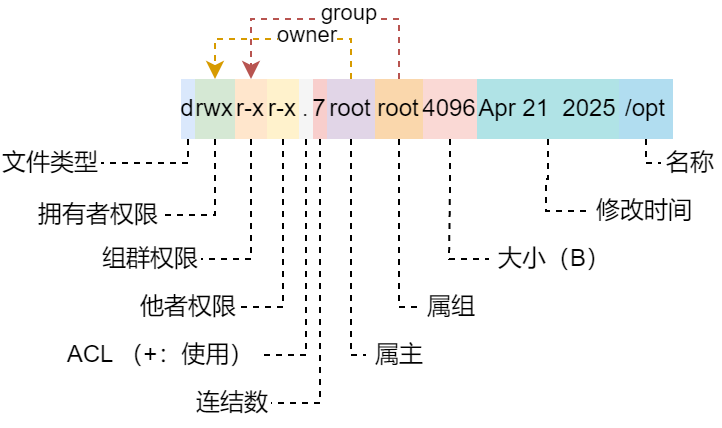
权限对于文件
| 标识 | 含义 |
|---|---|
| r | 可读取文件内容 |
| w | 可对文件内容进行编辑 |
| x | 文件具备执行权限。通常是二进制程序文件(binary file),或脚本文件。 |
权限对于目录
| 标识 | 含义 |
|---|---|
| r | 可读取目录中的文件信息。如,ls、[tab]补齐 |
| w | 可在该目录下创建文件或目录。 |
| x | 具备进入该目录和删除的能力。 |
权限标识的数字编码
关联, chmod 程序的参数
| 标识 | 二进制 | 十进制 |
|---|---|---|
| eXecute | 2⁰ | 1 |
| Write | 2¹ | 2 |
| Read | 2² | 4 |
| SBIT | 2⁰ | 1 |
| SGID | 2¹ | 2 |
| SUID | 2² | 4 |
运行时权限
运行时变更权限以便执行指令或限制目录下的操作。
SUID, Set UID
指令运行时(Runtime),进程身份切换为所属主;额外的需要用户对该程序文件拥有执行权限(eXecute)
sh
$ ls -ld /usr/bin/passwd
-rwsr-xr-x. 1 root root 68248 Mar 23  2023 /usr/bin/passwd

# 执行并转移到后景
$ passwd &

# 打印进程树
$ pstree -u
systemd─┬─sshd───sshd───sshd(x)───bash─┬─passwd(root)

$ jobs -l
[4]+ 114049 Stopped (tty input)     passwd
即,普通用户执行 passwd 时进程身份变为 root。
SGID, Set GID
- 对于程序,指令运行时(Runtime),进程身份切换为属群;额外的需要用户对该程序文件拥有执行权限(eXecute)
- 对于目录,普通用户对于该目录拥有 w 权限,在其中创建的文件或目录会继承其属组。(组群共享目录,其下内容皆属组群。)
sh
$ sudo mkdir /tmp/test
$ sudo groupadd test
$ sudo chmod 770 /tmp/test
$ sudo chmod g+s /tmp/test
$ sudo chgrp test /tmp/test
$ usermod -G test x
$ mkdir /tmp/test/a.dir
$ touch /tmp/test/a.txt

$ ls -ld /tmp/test
drwxrws---. 7 root test 4096 Jan  4 20:06 /tmp/test
$ ls -ld /tmp/test/a.dir
drwxr-sr-x. 2 x    test 4096 Jan  4 20:12 /tmp/test/a.dir
$ ls -l /tmp/test/a.txt
-rw-r--r--. 1 x    test 4    Jan  4 20:12 /tmp/test/a.txt
SBIT, Sticky BIT
共享目录所有用户都会拥有 wx 权限,可以任意删除内容。添加 SBIT 权限增加限制,仅限属主和 root 拥有删除功能。
sh
# /tmp 目录天生拥有 SBIT。
$ ls -ld /tmp
drwxrwxrwt. 11 root root 4096 Jan  4 20:47 /tmp
相关设置
| UID | 使用者 | |
|---|---|---|
| 0 | root | |
| 1~200 | 系统保留,distributions 自行分配系统账号 | |
| 201~999 | 用户定义的系统账号 | |
| 1000+ | 一般用户 |
用户信息:/etc/passwd
- 1、账号
- 2、密码(挪移到
/etc/shadow文件下) - 3、UID
- 4、GID
- 5、用户说明
- 6、家目录
- 7、预设 Shell
组群信息:/etc/group
- 1、组群
- 2、组群密码(目前少用)
- 3、GID
- 4、假如组群的账号(以逗号 ’,‘ 分割)
密码信息:/etc/shadow
- 1、账号
- 2、密码(目前默认 SHA512 加密)
- 3、最近变更日期(1970-01-01 起累计天数)
- 4、不可变更天数(0:不限制)
- 5、需要变更天数(0:不限制)
- 6、变更前告警天数(0:不限制)
- 7、过期后宽限天数
- 8、失效日期(1970-01-01 起累计天数)
- 9、暂未使用
创建用户默认行为:/etc/defualt/useradd
Default values for useradd
- GROUP=100()
- HOME=/home(家目录位置)
- INACTIVE=-1(密码是否失效)
- EXPIRE=(密码失效天数,-1:永远有效)
- SHELL=/bin/sh
- SKEL=/etc/skel(默认家目录结构和文件)
- CREATE_MAIL_SPOOL=yes(是否建立邮件信箱)
密码设置默认行为:/etc/login.defs
grep -v '#' | grep -v '^$' 配置如下:
sh
MAIL_DIR        /var/mail
FAILLOG_ENAB            yes
LOG_UNKFAIL_ENAB        no
LOG_OK_LOGINS           no
SYSLOG_SU_ENAB          yes
SYSLOG_SG_ENAB          yes
FTMP_FILE       /var/log/btmp
SU_NAME         su
HUSHLOGIN_FILE  .hushlogin
ENV_SUPATH      PATH=/usr/local/sbin:/usr/local/bin:/usr/sbin:/usr/bin:/sbin:/bin
ENV_PATH        PATH=/usr/local/bin:/usr/bin:/bin:/usr/local/games:/usr/games
TTYGROUP        tty
TTYPERM         0600
ERASECHAR       0177
KILLCHAR        025
UMASK           022
PASS_MAX_DAYS   99999
PASS_MIN_DAYS   0
PASS_WARN_AGE   7
UID_MIN                  1000
UID_MAX                 60000
SUB_UID_MIN                100000
SUB_UID_MAX             600100000
SUB_UID_COUNT               65536
GID_MIN                  1000
GID_MAX                 60000
SUB_GID_MIN                100000
SUB_GID_MAX             600100000
SUB_GID_COUNT               65536
LOGIN_RETRIES           5
LOGIN_TIMEOUT           60
CHFN_RESTRICT           rwh
DEFAULT_HOME    yes
USERGROUPS_ENAB yes
ENCRYPT_METHOD SHA512
NONEXISTENT     /nonexistent
PREVENT_NO_AUTH superuser
注意:非批量管理账户时不必要修改配置文件创建用户后再修改,也可达到等同效果。
指令操作
sh
# create a new user or update default new user information
$ useradd
# 创建无法登录用户
$ user add -s /usr/sbin/nologin <user>

# delete a user account and telated files
$ userdel

# 删除用户家目录和邮件池目录
$ userdel -r <user>

# modify a user account
$ usermod

# 添加 groups
$ usermod -G <GROUPS> <user>
# 移除 groups
$ usermod -r -G <GROUPS> <user>

# change user password
$ passwd

# 从标准输入修改密码
$ echo '<password>' | passwd --stdin <user>

# 查看用户密码状态
$ passwd -S <user>

# change user password expiry information
$ chage

# 查看用户密码状态
$ chage -l <user>

# create a new group
$ groupadd
# delete a group
$ groupdel
# modify a group definition on the system
$ groupmod

# print real and effective user and group IDs
$ id
# 查询账号 uid、gid、groupsid
$ id <user>

# print the groups a user is in
$ groups
Auth, authorization
指令操作
sh
# change file owner and group
$ chown
# 递归修改
$ chown -R owner<:group> <dir>

# change group ownership
$ chgrp
# 递归修改
$ chgrp -R <group> <dir>

# set file mode creation mask
$ umask
# 预设权限
# file: 666 - umake
# 例如,022 则创建文件时权限为 rw-r--r--
# dir: 777 - umake
# 例如,022 则创建目录时权限为 rwxr-xr-x

# change file mode bits
$ chmod

# mode bits 方式
$ chmod 755 <dir>
 chmod 644 <file>

# suid,sgid,sbit
$ chmod 4775 <file>
$ chmod 1775 <dir>
$ chmod 2775 <dir>
$ chmod 3775 <dir>

# u,g,o。-,+,= 方式
$ chmod u+x <file|dir>
$ chmod u-w <file|dir>
$ chmod u=rwx <file|dir>

# suid,sgid,sbit
$ chmod u+s <file>
$ chmod g+s <dir>
$ chmod o+s <dir>
sudo
特权管理工具,允许授权用户以指定用户(默认 root)的身份执行明林,无需切换到目标用户。
- 日志审计:操作会有日志记录(Debian:
/var/log/auth.log, RadHat:/var/log/secure)。 - 精细控制:可限制命令、主机(IP)、身份。
- 临时权限:仅需用户密码或无密码(
NOPASSWD)。
注意:避免文本编辑工具编辑,语法错误会导致锁死 sudo 权限。
sh
# 可编辑 sudoer 文件
# mode bit: 440, root:root
# - /etc/sudoers (尽量避免该文件)
# - /etc/sudoers.d/* (自定义在该目录下)

# edit the sudoers file
$ visudo
# 编辑工具设定。EDITOR 系统环境变量执行 visudo 指令使用的编辑工具
# visudo 写入时会进行语法校验。
$ visudo </etc/sudoers.d/file>

# 字段说明
# User privilege specification
#1      2    3        4        5
root    ALL=(ALL:ALL) NOPASSWD:ALL
# 普通用户授予如上配置等同于root权限,真实环境下应当禁止。
# 1: 用户/组,组以‘%’开头(如,%wheel)
# 2: 主机列表,允许使用 sudo 的主机名或IP,ALL 表示所有主机
# 3: 身份列表,允许切换到的用户/组,格式:user:group,ALL 表示所有用户。
# 4: 选项,NOPASSWD(免密码)、NOEXEC(禁止命令参数注入,可防止命令通过 `!`、`;` 等符号执行额外操作(如 `sudo vi /etc/passwd; rm -rf /`))
# 5: 命令列表,允许执行的命令(使用绝对路径);不允许执行的指令以叹号(!)开头;指令间以逗号分隔(,);ALL 表示所以指令。

# 别名
# 主机别名:Host_Alias HOSTS = hostname, 192.168.1.2
# 用户/群组:User_Alias USERS = user1, %group
# 命令别名:Cmnd_Alias CMDS = /usr/bin/df, /usr/bin/du
# 运行别名:Runas_Alias RUSERS = mysql, postgres

# Defaults 全局默认配置
# 用于设置 sudo 的默认行为,可全局生效或针对特定用户、组群、主机。
# 全局
Defaults        env_reset
# 特定
Defaults:%whell env_reset
env_reset: 重置环境变量(防止恶意注入)
timestamp_timeout: 缓存密码时间(0:立即失效,-1:永久)
passwd_tries: 密码尝试次数
secure_path: 安全PATH环境变量
log_output: 记录命令输出到日志
su
多人场景下,尽量别使用这个指令。(密码泄露!以及更大的风险)
sh
# Superuser Do
# execute a command as another user
$ sudo
# run login shell as the target user; a command may also be specified
$ sudo -i <user>
$ sudo <CMD>
# edit the sudoers file
# ------
# run a command with substitute user and group ID
$ su
# make the shell a login shell
$ su - <user>
$ su -l <user>
$ su --login <user>
ACL, Access Control List
在传统权限设置之外,针对用户、组群、mask 设置。
ACL 可设定对象:
- owner
- group
- mask:预设权限
支持 ACL 功能的文件系统:
- ext3
- ext4
- XFS
- Btrfs
- ZFS
- F2FS
- VFAT/NTFS(通过 fuse 或内核驱动优先支持)
sh
$ dmesg | grep -i acl
[    3.058700] systemd[1]: systemd 252.36-1~deb12u1 running in system mode (+PAM +AUDIT +SELINUX +APPARMOR +IMA +SMACK +SECCOMP +GCRYPT -GNUTLS +OPENSSL +ACL +BLKID +CURL +ELFUTILS +FIDO2 +IDN2 -IDN +IPTC +KMOD +LIBCRYPTSETUP +LIBFDISK +PCRE2 -PWQUALITY +P11KIT +QRENCODE +TPM2 +BZIP2 +LZ4 +XZ +ZLIB +ZSTD -BPF_FRAMEWORK -XKBCOMMON +UTMP +SYSVINIT default-hierarchy=unified)

# get file access control lists
$ getfacl

# set file access control lists
$ setfacl
# modify the current ACL(s) of file(s)
# user,group
$ setfacl -m <u|g>:<user:group>:[r|w|x|rw|rx|wx|rwx] <path>
# umask
$ setfacl -m m::[r|w|x|rw|rx|wx|rwx] <path>

# acl 默认权限,目录下创建的文件保持 default 设置
default:user::rwx
default:user:user1:rwx
default:group::r-x
default:mask::rwx
default:other::r-x

# 针对用户
$ setfacl -m d:<user>:[r|w|x|rw|rx|wx|rwx] <path>
# 针对组群
$ setfacl -m d:g:<group>:[r|w|x|rw|rx|wx|rwx] <path>

# remove entries form the ACL(s) of file(s)
$ setfacl -x <u|g>:<user|group> <path>
$ setfacl -x m <path>

# 删除默认设置
$ setfacl -x d:<user> <path>
$ setfacl -x d:g:<group> <path>

# remove all extended ACL entries
$ setfacl -b <path>